














Wordle Scratch Edition
Wordle Scratch Edition Overview
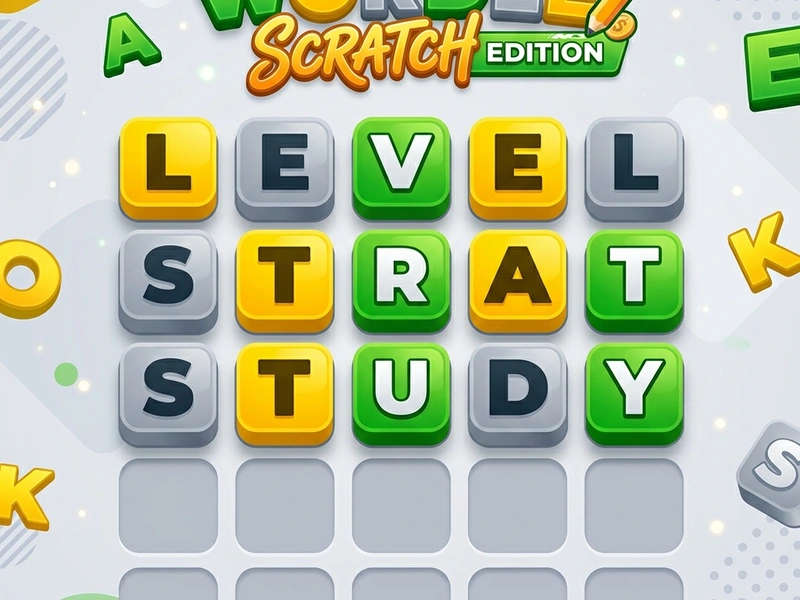
Guess the secret five-letter word in six attempts with the highly engaging Wordle Scratch Edition! In this fun word-guessing puzzle game based on the famous viral game, you have exactly six attempts to guess a secret five-letter word. Many people who search for the unblocked web version of Wordel find this Scratch edition to be the ultimate online representation, offering clean visuals, a massive dictionary, and unlimited gameplay to test your vocabulary skills.
The Story of the Viral Word Puzzle
Wordle was originally created in 2021 by Welsh software engineer Josh Wardle as a private game for his partner who loved word puzzles. He released it to the public in late 2021, and by January 2022, it had become a global phenomenon, with millions of players sharing their green and yellow grid patterns on social media. The New York Times subsequently acquired the game. This Scratch recreation captures the elegant simplicity of the original game while allowing players to enjoy unlimited games, bypassing the daily restrictions of the official NYT website.
Game Rules & Color Clues
To start, type any valid five-letter English word and press Enter. The game will change the colors of the grid tiles to provide clues about the hidden word. A green tile indicates that the letter is in the correct position. A yellow tile means the letter is present in the secret word but is currently placed in the wrong position. A grey tile means the letter does not appear in the target word at all. You must use these clues to narrow down the possibilities and guess the correct word within six attempts.
Pro Strategies & Best Starting Words
- Use Vowel-Rich Starting Words: Start with words containing multiple vowels and common consonants (like ARISE, ADIEU, SLATE, or CRANE). This helps you quickly find which vowels are present.
- Avoid Repeating Grey Letters: Pay attention to the virtual keyboard on the screen. It highlights used letters in grey. Do not use words containing these letters in your subsequent guesses.
- Try Different Consonants: By your third guess, if you still don't know the word, try to guess a word containing entirely new consonants to eliminate letters.
- Look for Double Letters: Remember that letters can appear more than once in the secret word (e.g., words like APPLE, SWEET, or CLASS). A green tile does not mean the letter is unique.
- Keep a Vocabulary List: The game utilizes standard English words. Practice regularly to expand your memory of five-letter words.
Controls Guide
- Keyboard Keys / On-screen Keys: Type Letter (Enters a letter into the active grid row.)
- Enter Key / On-screen Enter: Submit Guess (Submits the typed 5-letter word for clue evaluation.)
- Backspace / On-screen Backspace: Delete Letter (Removes the last typed letter from the grid cell.)
Key Game Highlights
- Clean grid styling with smooth color-flip animations.
- Massive built-in dictionary preventing players from guessing invalid words.
- Interactive keyboard highlighting to track used, unused, and correct letters.
- Unlimited puzzles, allowing you to play as many matches as you want.
💬 0 Comments
Leave a Comment