












Walfie's Nonograms
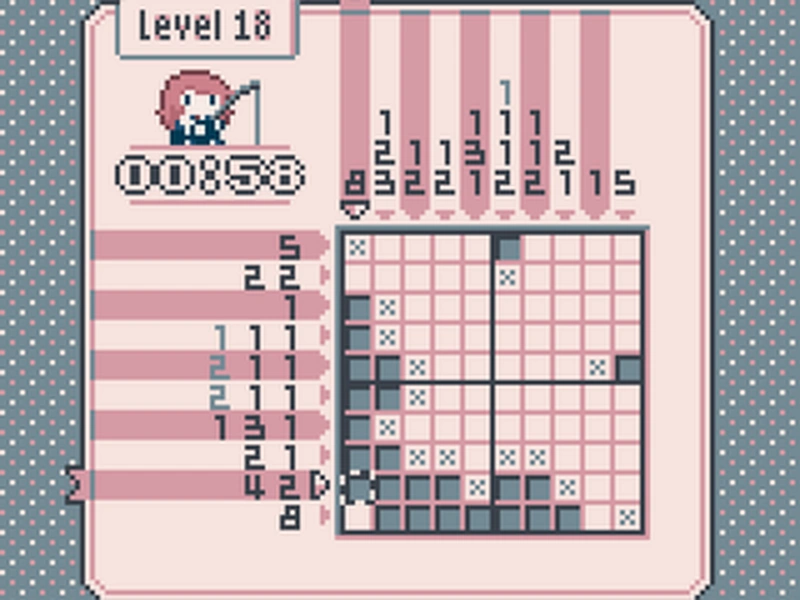
Welcome to the highly engaging world of Walfie's Nonograms, a completely free-to-play experience that brings the classic nonogram puzzle format to the Game Boy Color. This title is designed for color systems but is also fully compatible with older, monochrome Game Boy systems, making it highly accessible for retro enthusiasts. Players have multiple convenient ways to enjoy this title. You can choose to play it directly in your web browser for instant access. Alternatively, you can run it in a dedicated Game Boy emulator such as BGB, SameBoy, or the RetroArch frontend for a more authentic and persistent experience. For the most dedicated retro gamers, you can even play it on a real Game Boy console by utilizing a flash cart. Furthermore, the game features full RetroAchievements support, allowing players to earn achievements while they play.
The core gameplay experience is packed with a massive amount of content and intuitive controls. To navigate the menus and the puzzle grid, players will rely on the Directional keys. For browser players, the keyboard equivalents are carefully mapped to ensure a seamless experience. In addition to standard play, a dedicated version of the game file has been made available specifically for Analogue Pocket users, ensuring the game runs flawlessly natively on that device as well.
Puzzle Sizes
The game boasts a robust collection of puzzles, ensuring that players of all skill levels have plenty of content to enjoy. The variety in grid dimensions means you can choose a quick session or a more involved challenge.
- The game includes a grand total of 150 distinct puzzles to solve.
- Players can start with smaller, more manageable 5x5 grids.
- For a moderate challenge, the game offers numerous 10x10 grids.
- For the most complex challenges, players can tackle the large 15x15 grids.
- The variety of dimensions ensures that both beginners and veterans have appropriate challenges available.
- The progression through different dimensions helps players build their logic skills gradually.
- With 150 levels, the game provides hours upon hours of engaging logic gameplay.
Cell Marking
Interacting with the grid is the most fundamental aspect of the game, and the controls have been fine-tuned for precision and ease of use. The input methods vary depending on whether you are using original hardware or playing via a web browser.
- To move your selection cursor across the grid, use the Directional keys.
- To fill in a cell that you are confident about, press the A button on a Game Boy or the Z key in your browser.
- To mark a cell with an "X" to indicate it should be empty, use the B button or the X key.
- To open or close the in-game menu during a puzzle, press Start or the Enter key.
- To confirm a selection within the menu, you also use the A button, Z key, Start, or Enter.
- To cancel out of a menu option, simply press the B button or the X key.
- A special "maybe" note feature is available by pressing Select or the Shift key.
- When marking multiple tiles by holding the fill button and moving, a short delay occurs when changing directions.
Clue Marking
Keeping track of your progress is vital, especially on the larger boards. The game includes specific features to help you remember which hints you have already fulfilled.
- Players have the ability to mark numbered clues on the edges of the grid.
- This function works similarly to the mechanic found in Mario's Super Picross.
- Marking these numbered clues helps you easily remember exactly what you have already solved.
- Recent updates have significantly improved the visual contrast for these marked clues.
- The improved contrast is especially helpful when playing on an emulator that lacks native color correction.
- The visual update ensures that the clue marking system remains clear and readable regardless of your display settings.
- The colors used for the marked clues were updated without altering the background colors, maintaining the original aesthetic.
Customization Options
To keep the experience fresh and personalized, the game offers a surprisingly deep level of customization for a retro title. You can adjust the visual and audio presentation to suit your specific preferences.
- The game features a staggering 31 different color palettes to choose from.
- To change the current color palette, press the Select button or Shift key along with the left or right Directional keys.
- There are 9 distinct background music (BGM) tracks included in the game.
- Some of the BGM tracks feature songs from objetdiscret's Fabulous Classical Chiptunes collection.
- To change the current BGM, press the Select button or Shift key along with the up or down Directional keys.
- If you prefer to play in silence, you can turn the BGM off entirely for both the main menu and the puzzle screen.
- When the BGM is completely disabled, the victory music that normally plays upon completing a level will also be muted automatically.
Progress Saving
Given the number of puzzles and the time it takes to complete the larger ones, robust saving features are an absolute necessity. The game provides multiple ways to track and preserve your ongoing progress.
- You can safely save your progress right in the middle of a puzzle and continue it later.
- Standard save files, such as .sav or .srm, are fully compatible across different versions of the game.
- The Save Data screen now features a useful "sum of best times" statistic.
- This statistic allows you to view your total cumulative playtime across all the levels you have successfully completed.
- Browser players must be cautious, as some web browsers will automatically delete local storage for sites that have not been used in a while.
- Due to this browser behavior, playing in a dedicated Game Boy emulator is highly recommended if you want to ensure your save data persists reliably.
- If your emulator automatically loads save states on startup, you may need to manually restart the console after updating.
💬 0 Comments
Leave a Comment